

From the corridor to the store's door
Visitors pick a store and see the route on the floor plan: which corridor to take, where to change floors and how far is left. In the industry this is called wayfinding.
- Routes between floors, by escalator, stairs and elevator
- The nearest restroom, ATM or elevator, in one tap
- In the browser, nothing to install

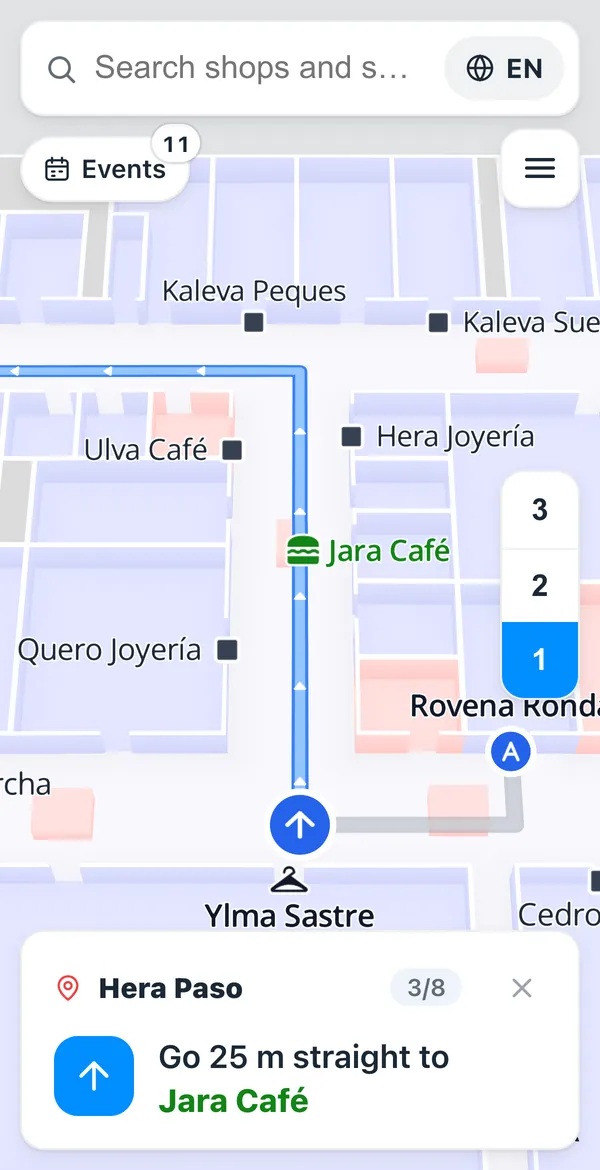
Where the route starts
At the QR code
Each QR code is at a known point in the mall: an entrance, a corridor, an elevator. When it is scanned, the route starts there.
Wherever the visitor chooses
Visitors can also mark the starting point: search for a nearby store or tap it on the plan.
Frequently asked questions
Does anyone need to install an app?
No. The map opens in the phone's browser, from the QR code or from the mall's website.
How does the map know where the visitor is?
From the QR code they scanned: each code is at a known point in the mall. If they opened the map from the website, they mark the starting point on the plan.
Do beacons or other equipment need to be installed?
No. Only QR codes are placed in the building. The map does not connect to the mall's systems or network.
Does the route work between floors?
Yes. The route shows where to go up or down: by escalator, stairs or elevator.
Is there a route for people with reduced mobility?
Yes. Visitors can ask for a route by elevators and ramps, with no stairs or escalators.
What happens if the mall's layout changes?
You let us know and we update the plan and the routes. A major remodel or a new floor we coordinate with you separately.

Let's see the routes on your mall's floor plan
A 15-minute meeting to show you the map working and how it would look in your venue. Write to us and we will set a date.